Cloud Security Best Practices Every Developer Should Know in 2025
Security in the cloud is a shared responsibility. Understanding your role and applying the right controls from day one can prevent the most common and costly breaches.
James Whitfield
Cloud Infrastructure Engineer · LightYear Cloud
Cloud providers secure the physical infrastructure — the data centres, the hypervisors, the network fabric. But everything above that layer is your responsibility: the operating system, your application, your data, and your access controls. This is the shared responsibility model, and understanding it is the first step to building secure cloud systems.
Use SSH Keys, Not Passwords
Password-based SSH authentication is a persistent source of breaches. Automated bots continuously scan the internet for exposed SSH ports and attempt credential stuffing attacks. The fix is straightforward: disable password authentication entirely and use SSH key pairs instead.
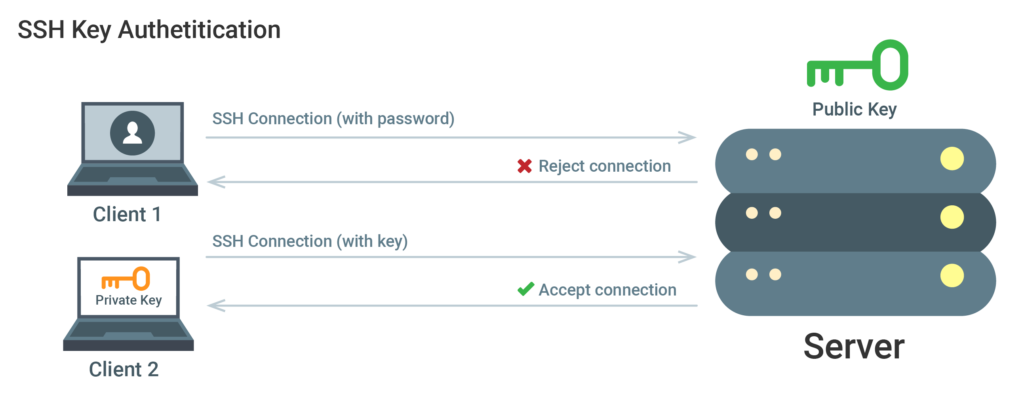
Generate a strong key pair (Ed25519 is the current recommendation), add your public key to the server, and disable PasswordAuthentication in /etc/ssh/sshd_config. This single change eliminates the vast majority of brute-force attack surface.
Apply the Principle of Least Privilege
Every user, service, and API key should have only the permissions it needs to perform its function — nothing more. This limits the blast radius of a compromised credential. Create dedicated service accounts for each application, use read-only credentials where writes are not needed, and audit permissions regularly.
Firewall rules follow the same principle. Block all inbound traffic by default and open only the ports your application explicitly requires. A web server typically needs ports 80 and 443. A database server should never be directly accessible from the public internet.
Keep Everything Updated
The majority of successful attacks exploit known vulnerabilities in unpatched software. Enable automatic security updates on your servers, subscribe to security advisories for the software you run, and establish a regular patching cadence for components that require manual updates.
Enable Monitoring and Alerting
You cannot defend what you cannot see. Set up logging for authentication events, firewall denials, and application errors. Configure alerts for anomalous patterns — failed login spikes, unusual outbound traffic, or unexpected process launches. Early detection dramatically reduces the impact of a security incident.
Ready to experience reliable cloud hosting?
Deploy your first server in under 60 seconds. No contracts, pay only for what you use.
Get Started Free